APM API Integration Notes
The general API workflow consists of following:
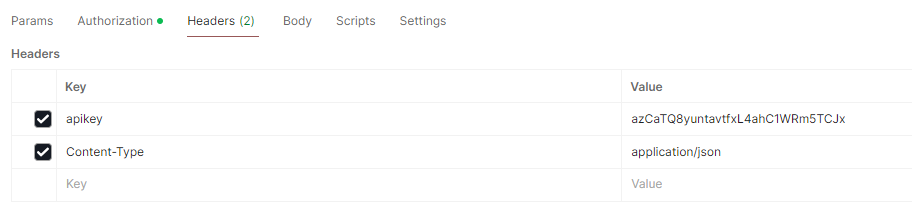
- Postman Guide
- Payment API
- Status API
- Payout API
- Balance API
- Payout Sandbox
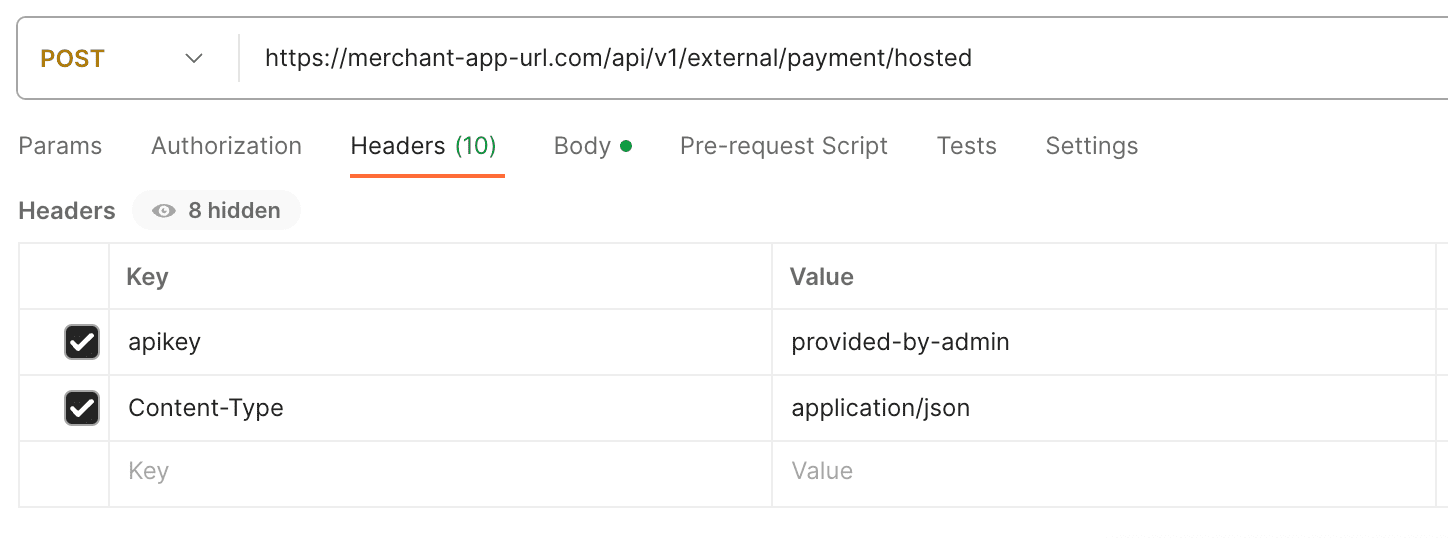
Postman Guide
| Field | Data Description |
|---|---|
| Request method | POST |
| Additional Request header | ‘apikey’ |
| Payment Request URL | https:// |
| Payout Request URL | https:// |
| Data format | All data is sent and received in the JSON format. |
| Content-Type | application/json |
| iFrame | The payment url for customers does not work in iframe |
Payment API
Payment Request Table
| Field Name | Data Description | Type | Min | Max | Example | Required |
|---|---|---|---|---|---|---|
| amount | float data type | NU | 3 | 7 | 50000.00 NOTE: currencies/solutions that do not support decimal values; THB - True Money IDR - all solutions VND - all solutions PHP - Maya, Gcash & Grabpay INR - all solutions CNY - all solutions KRW - all solutions | yes |
| currency | ISO 4217 numeric code | CH | 3 | 3 | PKR | yes |
| callbackUrl | Url where payment callback will be sent | URL | – | – | https://send-here.com | yes |
| country | ISO 3166-1-alpha-2 | CH | 2 | 2 | PK | yes |
| Valid email format | AN | 6 | 120 | name@email.com | yes | |
| ip | Customer’s IP | IP | – | – | 123.13.43.23 | yes |
| method | Methods supported, see table below. | CH | – | – | WALLETS | yes |
| midId | For technical purposes. | NU | 1 | – | 187 | yes |
| returnUrl | Url to redirect after payment | URL | – | – | https://return-here.com | yes |
| orderId | Merchant Order ID | AN | 1 | 50 | abc123456 (For IDR & BRL PIX channels, length is between 6-32 char) | yes |
Payment statuses
| TX Type | Event | Status |
|---|---|---|
| Received: | Temporary | PENDING |
| currency | ISO 4217 numeric code | SUCCESS |
| callbackUrl | Url where payment callback will be sent | REJECTED, FAIL |
ASIA
| Currency | Country | Method Parameter | Solution |
|---|---|---|---|
| 🇧🇩 BDT | Bangladesh | BANK_TRANSFER | bKash, Nagad, Rocket, uPay |
| 🇨🇳 CNY | China | BANK_TRANSFER | Card To Card |
| 🇮🇩 IDR | Indonesia | BANK_TRANSFER | CIMB Niaga, Permata |
| 🇮🇩 IDR | Indonesia | WALLETS | Dana, Indonesia Mobile Apps, Link-Aja, |
| 🇮🇩 IDR | Indonesia | QR_CODE | scan QR code,OVO |
| 🇮🇩 IDR | Indonesia | VIRTUAL_ACCOUNT | Bank Transfer via Virtual Account, OVO |
| 🇮🇳 INR | India | BANK_TRANSFER | Netbanking |
| 🇮🇳 INR | India | UPI | QR, INTENT |
| 🇯🇵 JPY | Japan | BANK_TRANSFER | Curfex Japan |
| 🇰🇷 KRW | South Korea | VIRTUAL_ACCOUNT | Virtual Account Payment Korea |
| 🇰🇷 KRW | South Korea | BANK_TRANSFER | Online Banking payment Korea Korea |
| 🇲🇾 MYR | Malaysia | BANK_TRANSFER | Online Bank transfer payment |
| 🇲🇾 MYR | Malaysia | QR_CODE | Boost, DuitNow QR Pay, GrabPay, MY banking apps, ShopeePay, TouchNGo |
| 🇲🇾 MYR | Malaysia | FPX | Online Banking payment via FPX |
| 🇲🇾 MYR | Malaysia | DUITNOW | Online Banking payment via DUITNOW |
| 🇵🇭 PHP | Philippines | WALLETS | GCASH, MAYA, QRPH, Grabpay |
| 🇵🇭 PHP | Philippines | BANK_TRANSFER | Online Bank transfer payment |
| 🇸🇬 SGD | Singapore | BANK_TRANSFER | Various Banks |
| 🇹🇼 TWD | Taiwan | VIRTUAL_ACCOUNT | Virtual Account Payment Taiwan |
| 🇹🇭 THB | Thailand | BANK_TRANSFER | Online Bank transfer payment |
| 🇹🇭 THB | Thailand | QR_CODE | Thai QR Payment |
| 🇹🇭 THB | Thailand | TRUEMONEY | Truemoney |
| 🇰🇭 USD | Cambodia | BANK_TRANSFER | Online Bank transfer payment |
| 🇻🇳 VND | Vietnam | BANK_TRANSFER | Online Bank transfer payment |
| 🇻🇳 VND | Vietnam | MOMOPAY | MoMo |
| 🇻🇳 VND | Vietnam | QR_CODE | Bank payment via QR code |
AFRICA
| Currency | Country | Method Parameter | Solution |
|---|---|---|---|
| 🇳🇬 NGN | Nigeria | BANK_TRANSFER | Bank Transfer,Opay |
| 🇳🇬 NGN | Nigeria | MOBILE_MONEY | Cards,Bank Account, NIBSS-QR, eNaira, USSD |
| 🇿🇦 ZAR | South Africa | BANK_TRANSFER | 1Voucher, Bank Transfer |
| 🇿🇦 ZAR | South Africa | MOBILE_MONEY | Cards |
| 🇰🇪 KES | Kenya | BANK_TRANSFER | Bank Transfer |
| 🇰🇪 KES | Kenya | MOBILE_MONEY | M-pesa |
| 🇬🇭 GHS | Ghana | BANK_TRANSFER | Bank Transfer |
| 🇬🇭 GHS | Ghana | MOBILE_MONEY | Cards |
| 🇺🇬 UGX | Uganda | BANK_TRANSFER | Bank Transfer |
| 🇺🇬 UGX | Uganda | MOBILE_MONEY | Cards |
| 🇷🇼 RWF | Rwanda | BANK_TRANSFER | Bank Transfer |
| 🇷🇼 RWF | Rwanda | MOBILE_MONEY | Cards |
| 🇿🇲 ZMW | Zambia | BANK_TRANSFER | Bank Transfer |
| 🇪🇬 EG EGP | Egypt | MOBILE_MONEY | Cards, Etisalat, Orange Money, Vodafone |
| 🇪🇬 EG EGP | Egypt | BANK_TRANSFER | Instapay, Telegram |
| 🇪🇬 EG EGP | Egypt | CASH | Fawry Pay |
| 🇪🇬 EG EGP | Egypt | MOBILE_MONEY | Cards |
| 🇨🇲 CM XAF | Cameroon | MOBILE_MONEY | Cards |
| 🇹🇿 TZ TZS | Tanzania | MOBILE_MONEY | Cards |
| 🇨🇮 CI XOF | Côte d'Ivoire | MOBILE_MONEY | Cards |
| 🇲🇦 MA MAD | Morocco | MOBILE_MONEY | CashPlus, Inwi Money, Jibi, MTCash, Orang Money |
| 🇲🇦 MA MAD | Morocco | BANK_TRANSFER | Wire Transfer |
LATAM
| Currency | Country | Method Parameter | Solution |
|---|---|---|---|
| 🇦🇷 ARS | Argentina | BANK_TRANSFER,CASH | Bank Transfer,Cash |
| 🇧🇷 BRL | Brazil | PIX, BANK_TRANSFER | PIX,BANK TRANSFER |
| 🇨🇴 COP | Colombia | BANK_TRANSFER,CASH | Bank Transfer,Cash |
| 🇨🇷 CRC | Costa Rica | BANK_TRANSFER,CASH | Bank Transfer,Cash |
| 🇬🇹 GTQ | Guatemala | BANK_TRANSFER,CASH | Bank Transfer,Cash |
| 🇲🇽 MXN | Mexico | BANK_TRANSFER,CASH | Bank Transfer,Cash |
| 🇵🇪 PEN | Peru | BANK_TRANSFER,CASH | Bank Transfer,Cash |
| 🇪🇨 USD | Ecuador | BANK_TRANSFER,CASH | Bank Transfer,Cash |
| 🇵🇦 USD | Panama | BANK_TRANSFER,CASH | Bank Transfer,Cash |
| 🇸🇻 USD | El Salvador | BANK_TRANSFER,CASH | Bank Transfer,Cash |
OTHERS
| Currency | Country | Method Parameter | Solution |
|---|---|---|---|
| 🇺🇸 USDT | Crypto | BEP20 | Binance Blockchain |
| 🇺🇸 USDT | Crypto | ERC20 | Ethereum Blockchain |
| 🇺🇸 USDT | Crypto | TRC20 | Tron Blockchain |
| 🇪🇺 EUR | Europe | OPEN_BANKING | Open Banking |
| 🇬🇧 UK GBP | UK | OPEN_BANKING | Open Banking |
| 🇨🇦 CA CAD | CANADA | BANK_TRANSFER | Interac |
Deposit Request Body & Response Sample
Request
Response
{
  "paymentUrl": "https://payment-url.com",
  "status": "PENDING",
  "message": "Transaction is being processed",
  "id": "e10a0ab0-fa57-40c8-9312-666369dff389",
  "orderId": "tr-d1111122327557544456647"
}
Payment Request Optional Data Field Table
| Field Name | Data Description | Type | Min | Max | Example | Required |
|---|---|---|---|---|---|---|
| address | Customer address | CH | 1 | – | Testshington Street | no |
| bankCode | Customer bank code | CH | 1 | – | DBS | no |
| city | Customer city | CH | 1 | – | City | no |
| lastName | Customer last name | CH | 1 | – | Doe | no |
| mobileNumber | Customer mobile number | CH | 1 | – | 5467756764 | no |
| name | Customer first name | CH | 1 | – | John | no |
| postalCode | Customer postal code | CH | 1 | – | 435645 | no |
| state | Customer state | CH | 1 | – | ST | no |
Payout Request Table
| Field Name | Data Description | Type | Min | Max | Example | Required |
|---|---|---|---|---|---|---|
| account | Beneficiary Account | CH | 1 | – | abc123 | yes |
| amount | float data type | NU | 3 | 7 | 50000.00 | yes |
| currency | Currency code. 4 letters | CH | 3 | 4 | PKR | yes |
| callbackUrl | Url where payment callback will be sent | URL | – | – | https://send-here.com | yes |
| country | ISO 3166-1-alpha-2 | CH | 2 | 2 | PK | yes |
| Customer’s email | AN | 6 | 120 | name@email.com | yes | |
| data | For additional parameters for payout | OBJ | – | – | data{ "name":"John Doe" } | Please refer to the payout request payload section for the additional required parameters |
| midId | For technical purposes. Must be provided. | NU | 1 | – | 187 | yes |
| orderId | Merchant Order ID | AN | 1 | 50 | abc123456 | yes |
| ip | Customer’s IP | IP | – | – | 123.13.43.23 | yes |
Payout Request Optional Data Field Table
The payout request “data" field contains possible additional parameters, which are provider dependent. If the parameters are missing, the required values will be asked (via web form) from the customer.
| Field Name | Data Description | Type | Min | Max | Example | Required |
|---|---|---|---|---|---|---|
| ifsc | Beneficiary ifsc number | CH | 1 | – | BSBN0001234 | yes(for INR only) |
| accountName | Beneficiary name | CH | 1 | – | Johny Cash | Please refer to the payout request payload section if required |
| bankCode | Beneficiary bank code | CH | 1 | – | BSBN0001111 | Please refer to the payout request payload section if required |
| bankName | Beneficiary bank | CH | 1 | – | BSBN Bank | Please refer to the payout request payload section if required |
| bankBranch | Beneficiary bank branch | CH | 1 | – | BB | Please refer to the payout request payload section if required |
| bankAddress | Beneficiary bank address | CH | 1 | – | BA | Please refer to the payout request payload section if required |
| bankCity | Beneficiary bank city | CH | 1 | – | Bank Area | Please refer to the payout request payload section if required |
| bankState | Beneficiary bank state | CH | 1 | – | Bank Province | Please refer to the payout request payload section if required |
| mobile | Beneficiary mobile number | CH | 1 | – | 5467756764 | Please refer to the payout request payload section if required |
Response Fields
| Description | Format | Explanation |
|---|---|---|
| Id | String | System Transaction ID |
| message | String | Payment response message |
| status | String | Transaction status |
| orderId | String | Merchant Order ID |
Payout Statuses
| TX Type | Event | Status |
|---|---|---|
| Received: | Temporary | PENDING |
| Approved: | Final | SUCCESS |
| Failed: | Final | REJECTED, FAIL |
Payout Postbacks
Each postback is a general HTTP POST request with a retry mechanism of maximum 5 attempts with a retry possibility every 3 minutes.
We only consume one unique orderId per merchant. After that, all transactions with the same ID will be rejected.
Payout Postback Table
| Title | Format | Explanation |
|---|---|---|
| id | String | System Transaction ID |
| orderId | String | Merchant Order ID |
| status | String | Transaction status |
| hash | String | Data signature for encryption |
Payout Postback Sample
header name ‘apikey’, header value <merchant-apikey>
{
  "id": "912z-1zs4-acvb-1bre3",
  "orderId": "merchtx12345",
  "status": "SUCCESS",
  "hash": "<system-generated-hash>"
}
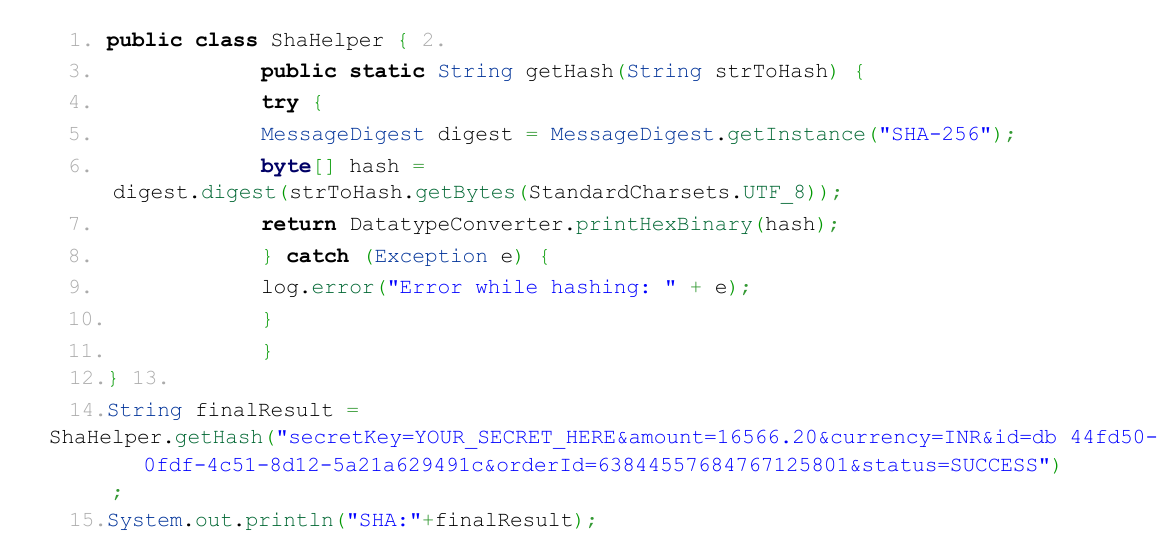
Data Signature of Payment & Payout
| Encryption Variables | Values and Explanations |
|---|---|
| apikey | <confidential> |
| Secret key | <confidential> + additional symbols ('0') to make it length of 16 |
| Encryption format | Concatenated and signed by using SHA-256 algorithm |
| Parameter order | The order must be in exact order as per below sample |
| Parameter example | Refer to the sample code in Java how to calculate the signature below. |
| Result string | Will be signed using SHA-256 |
How do you calculate signature for Payment/Payout request?
- ONLY use the fields specified in docs.t365.io documentation for signature generation. Below you can find example code in Java how to calculate the signature.
Status API
It is possible to get transaction status via the Status API:
| Field | Data Description |
|---|---|
| Payment Status Request URL | https:// |
| Payout Status Request URL | https:// |
| Data format: | All data is sent and received in the JSON format. |
| Content-Type: | application/json |
| Headers: | ‘apikey’: |
Status API Request Fields
Provide id or orderId.
| Field | Description |
|---|---|
| id | System Transaction ID |
| orderId | Merchant Order ID |
Status API Response Fields
| Field | Description |
|---|---|
| status | Payment status |
| id | System Transaction ID |
| orderId | Merchant Order ID |
| amount | Payment amount |
| currency | Payment currency |
| createdAt | Payment created date |
| paidAt | Payment paid date |
Balance API
Enquire the available MID balance by adding midId into the request path as a parameter.
Balance API information
| Field | Data Description |
|---|---|
| Balance Request URL | https:// |
| Data format: | All data is sent and received in the JSON format. |
| Content-Type: | application/json |
| Headers: | ‘apikey’: |
Balance API Request Fields
Merchant must provide midId.
| Field | Description |
|---|---|
| midId | MID ID |
Balance API Response Fields
| Field | Description |
|---|---|
| balance | Balance of the MID |
Balance API Response Sample
{
  "balance": "double"
}
Sandbox Response
Status Endpoint
| API Endpoint: | (/api/v5/external/payout/s2s) |
|---|---|
| Use “email" parameter | Response |
| rejected@test.com | REJECTED |
| success@test.com | SUCCESS |
| fail@test.com | FAILED |
Common API Errors
Deposit Transactions
| Error Message | Possible Root Cause | Resolution |
|---|---|---|
| Unexpected error: Payment not supported | Setup should be checked with T365. | Contact Merchant Support Team |
| "status":"REJECTED","message":"Transaction rejected by processor" | Missing value or invalid data in parameters | Contact Merchant Support Team |
| ERROR: platform not setting | Setup should be checked with T365. | Contact Merchant Support Team |
| Unexpected error occurred: | Missing value or invalid data in parameters | Contact Merchant Support Team |
| Technical error in bank's system | Setup should be checked with T365. | Contact Merchant Support Team |
| ERROR: No MID with given ID found | MID setup should be checked to T365. | Contact Merchant Support Team |
Withdrawal Transactions
| Error Message | Possible Root Cause | Resolution |
|---|---|---|
| ERROR: Insufficient Payout Balance. Please contact your account manager. | Amount sent for payout transaction is greater than the current balance. | Contact Merchant Support Team |
| Do payout through api error: Payout is disabled! | Payout setup is disabled. | Contact Merchant Support Team |
| Source of request not in IP whitelist. | Merchant IP address is not whitelisted on the connection. | Contact Merchant Support Team and provide Merchant IP address |
| ERROR: No MID with given ID found | MID setup should be checked to T365. | Contact Merchant Support Team |
API Integration Per Region
Latin America (LATAM)
This section provides sample request payload for several payment methods for Latin America region. The countries covered are the following:
- Argentina
- Brazil
- Chile
- Columbia
- Costa Rica
- Ecuador
- El Salvador
- Guatemala
- Mexico
- Panama
- Peru
This section provides sample PAYOUT request payload Latin America (LATAM) region. The countries covered are the following:
- Brazil
ASIA
This section provides sample request payload for several payment methods for Asia region. The countries covered are the following:
- Philippines
- Cambodia
- South Korea
- Indonesia
- Vietnam
- Thailand
- Malaysia
- India
- Hong kong
- China
- Bangladesh
- Singapore
This section provides sample PAYOUT request payload ASIA region. The countries covered are the following:
- India
- Vietnam
- Indonesia
- Malaysia
- Thailand
- Philippines
- China
- South Korea
- Hong kong
- Cambodia
AFRICA
This section provides sample request payload for several payment methods for South Africa region. The countries covered are the following:
- Nigeria
- South Africa
- Tanzania
- Kenya
- Zambia
- Ghana
- Rwanda
- Burkina
- Senegal
- Egypt
- Morocco
This section provides sample PAYOUT request payload AFRICA region. The countries covered are the following:
- Nigeria
- South Africa
- Ghana
- Egypt
- Morocco
OTHER Region
This section provides sample request payload for several payment methods for other regions. The countries covered are the following:
- Canada
- Europe
NOTE: Please refer to Annex 1 for the required parameters found under shopper attribute
Annex 1
NOTE: tax_id: 1.234.567.890
| Country | tax_id_type |
|---|---|
| BRAZIL | BRA_CPF BRA_CNPJ |
| CHILE | CHL_RUT RUT |
| PERU | DNI |
| COLOMBIA | COL_PSP COL_CDC COL_CDE COL_NIT COL_RCN COL_TI COL_CC COL_TE COL_CE COL_DIE COL_ICE ALL_Pasprt |
Remarks: Person tax ID Type | String (Required only for Brazil, Chile and Colombia)
GET Bank Codes API
Instructions on how to Bank Lists using GET method on postman:
Sample URL: https://prod50.t365.io/api/v1/external/bank-codes/123/PHP/list
a. prod50 - <merchant’s prod number>
b. 123 - <merchant’s midID>
c. PHP - <merchant’s currency>
Step 1: Under Authorization tab, select Auth Type section to OAuth 2.0
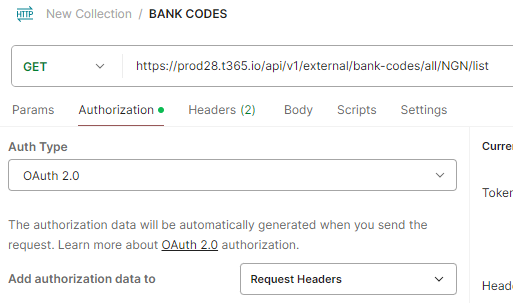
Step 2: Under Authorization tab, fill in details for the following fields under Configure New Token section:
Callback URL: - < webhook URL >
Client ID: - < to be provided >
Client Secret: - < to be provided >
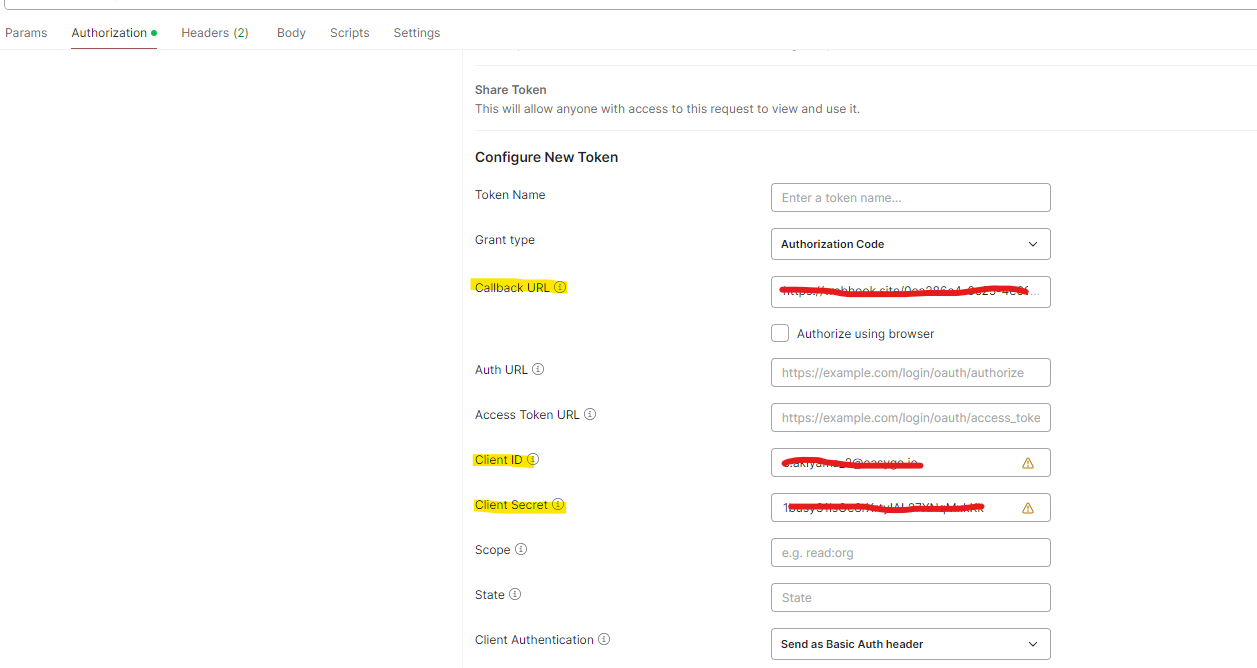
Step 3: Under Headers tab, fill in details for the following fields:
apikey: < to be provided >
Content-Type: application/json